Android Security

Android deep-link vulnerabilities: how intent filters lead to account takeover
Android deep-link vulnerabilities arise from how deep links are implemented and handled in app code, allowing attackers to hijack URI schemes, redirect WebViews to arbitrary URLs, or reach non-exported components through chained exploits. The results: account takeover, token theft, and data exfiltration.
Every major app uses deep links. Most teams don't think twice about the security implications. In this article, we walk through the five vulnerability patterns we see in production apps during mobile application security testing, and what static analysis catches vs. what only dynamic testing reveals.
How intent filters create an attack surface
On Android, deep links are declared via <intent-filter> elements in the manifest. They tell the OS which component should handle a given URI scheme, host, or path. The PackageManager resolves incoming intents by matching them against all registered filters across all installed apps.
It is worth noting that intent filters are not designed to be a security control. Even correctly configured filters can be bypassed using intent selectors, which allow a sending app to override filter matching entirely. The misconfigurations below create exploitable conditions, but the deeper issue is that intent filters were never meant to enforce access control. For example, an intent:// URL with a selector can target a specific component directly, bypassing filter matching entirely:
intent://open#Intent;scheme=myapp;component=com.victim/.InternalActivity;action=android.intent.action.SEND;SEL;action=android.intent.action.VIEW;end
When the Intent parsed from this URI is passed to startActivity(), it will launch InternalActivity with an unexpected SEND action value, even though the intent filter was matched using the VIEW action. Note that Chrome blocks intent selectors, but most WebView implementations and Firefox do not.
Several misconfigurations turn a routine filter into a security issue:
android:exported="true"without permission checks. Any third-party app can send intents to this component.Custom URI schemes without verification.
myapp://can be claimed by any app that installs first.
The combination of exported=true + BROWSABLE category + no parameter validation is the single most common setup we see in production apps. It is the default configuration for "make deep links work". It is also the one that gets apps compromised.
Five vulnerability patterns that lead to real impact
Custom scheme hijacking
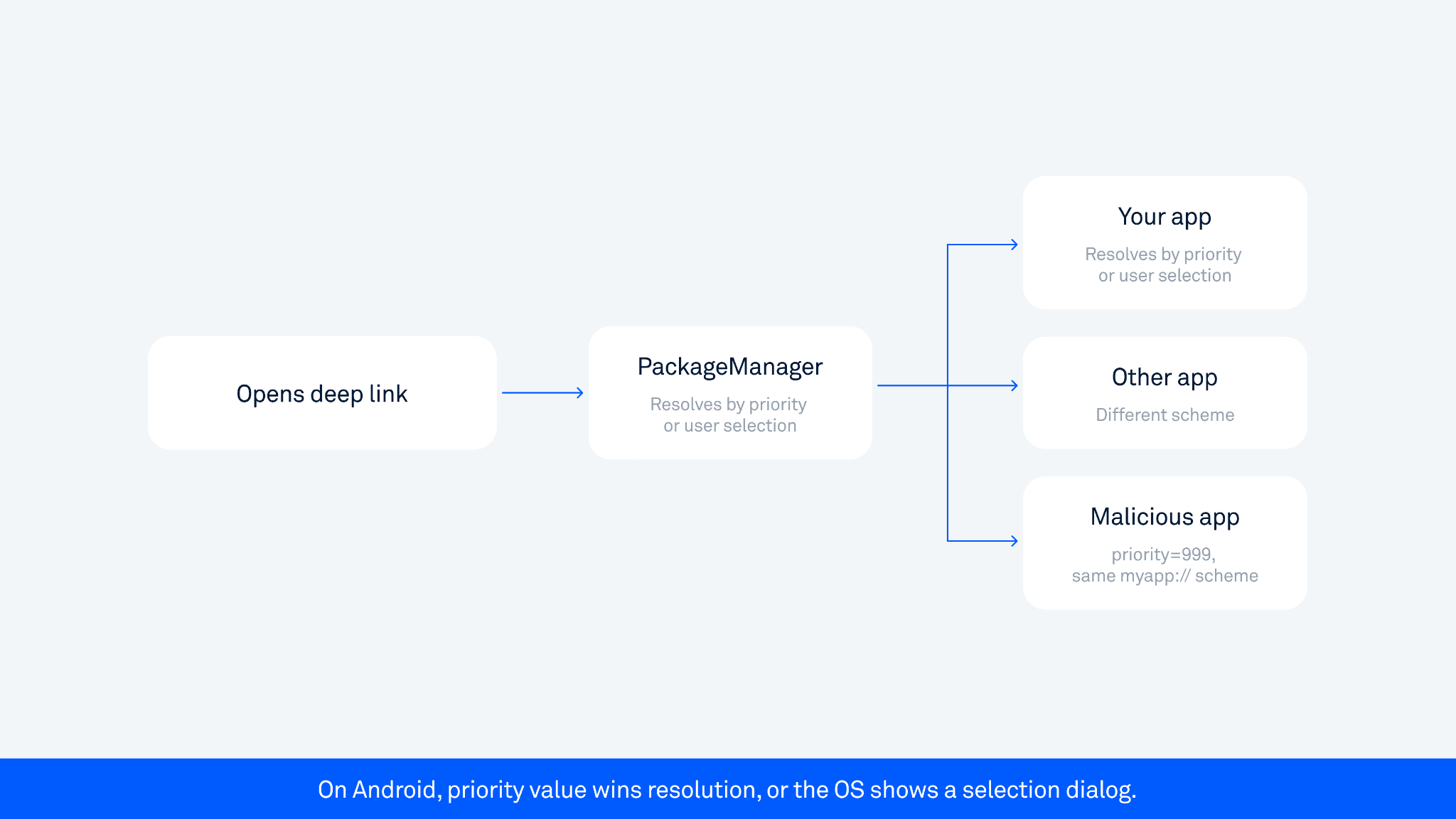
When an app registers a custom URI scheme, like myapp://, there is no system-level enforcement that only your app handles it. Any installed app can claim the same scheme.
On Android, a malicious app can register the same scheme with a higher priority value (up to 999), or the OS may present the user with an app selection dialog. On Android 12+, unverified links default to the browser, but the risk shifts to OAuth flows. After a user authenticates, the authorization code returns to myapp://oauth?code=xyz. If a malicious app intercepts that callback, it may be able to exchange the code for an access token, though OAuth flows that implement PKCE (a code verifier token) reduce this risk since the malicious app would not have the verifier. Account takeover is possible but not guaranteed, depending on the OAuth implementation. This risk is not limited to OAuth flows. Any sensitive token passed via a URI callback can be intercepted the same way - password reset tokens, magic login links, or any value the app receives as a deep link parameter.
Open redirect via deep links
A deep link accepts a URL parameter and passes it to a WebView. Apps typically add a host check, like startsWith("https://trusted.com") or contains("trusted.com") and consider the problem solved.
Neither is safe. Both checks are trivially bypassed with payloads like https://trusted.com@attacker.com/ or https://trusted.com.attacker.com/steal. We demonstrated this exact pattern during a live scan of a major Asian super-app: their routing library used a startsWith check that was bypassable with three different payload variants.
For a detailed breakdown of WebView misconfigurations, see our checklist: Android security checklist: WebView.
Intent redirection via WebView
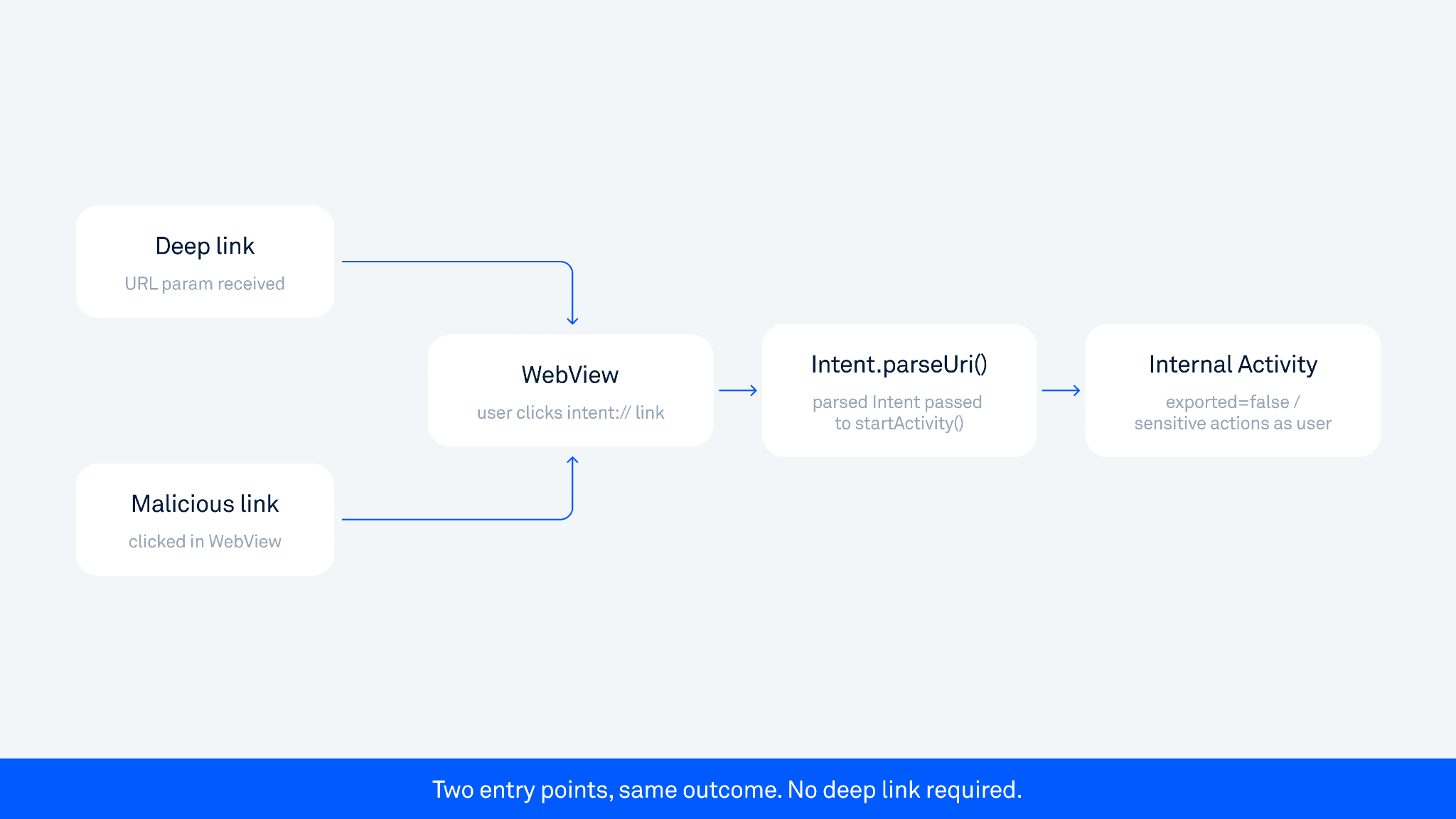
Android supports loading intent:// URLs in WebViews. If an app parses deep link URLs Intent.parseUri() and passes the result to startActivity(), an attacker can access internal, non-exported components, even if those components are declared private.
This does not require a deep link as the entry point. It triggers when a user clicks a intent:// link on a page loaded inside the WebView, whether they arrived at that page via a deep link, a malicious redirect, or normal in-app browsing. We call this "limited intent redirection" because certain flags and data types are blocked. But it still allows launching arbitrary internal Activities, which opens paths to authentication bypasses and access to protected screens.
In one case involving a major Asian super-app, the chain went: a user clicked an intent:// link inside the WebView, Intent.parseUri() was called, an internal non-exported Activity was launched, enabling conducting actions on the user's behalf, such as sharing sensitive data.
For the underlying mechanics, see our research: Android: Access to app protected components.
Full intent redirection
The more dangerous variant: an exported activity extracts a nested Intent object from extras and passes it directly to startActivity(). This is a full pass-through. An attacker crafts a nested Intent targeting any internal component with arbitrary flags and data, including FLAG_GRANT_READ_URI_PERMISSION to access non-exported Content Providers. File exfiltration chains are built exactly this way.
Domain takeover via expired whitelist entry
The subtlest pattern and one of the hardest to catch with any automated tool.
The app has a URL whitelist on the Android side that is not bypassed. Instead, the whitelist itself contains an expired domain that the attacker was able to register and take over. The Android check passes legitimately because the domain is on the whitelist. The app loads the attacker-controlled URL, sends authorization headers, and the attacker captures a valid auth token. Full account takeover.
What makes this hard to catch: the Android code looks correct. The whitelist check works as intended. The vulnerability is that one of the trusted domains is no longer trusted in practice. Static analysis cannot know that a domain has expired. Dynamic testing can flag the behavior at runtime, but identifying stale domains requires monitoring domain registration status alongside security scanning.
Custom schemes vs. App Links: the security difference
The OWASP Mobile Security Testing Guide covers verification requirements in detail (MASTG: Testing Deep Links).
Custom URI schemes | HTTPS App Links | |
Hijack risk | High, any app can claim the same scheme | Low, tied to domain ownership |
System verification | None | Via |
OAuth safety | Unsafe, codes can be intercepted | Safe if correctly configured |
Deep link misconfigurations map directly to OWASP Mobile Top 10 categories M3 (Insecure Authentication) and M8 (Security Decisions via Untrusted Inputs).
App Links eliminate scheme hijacking but have their own bypass surface: misconfigured assetlinks.json, wrong SHA-256 fingerprints, or silent verification failure that falls back to browser handling. For OAuth flows: always use App Links, never custom schemes.
What SAST catches and what it cannot
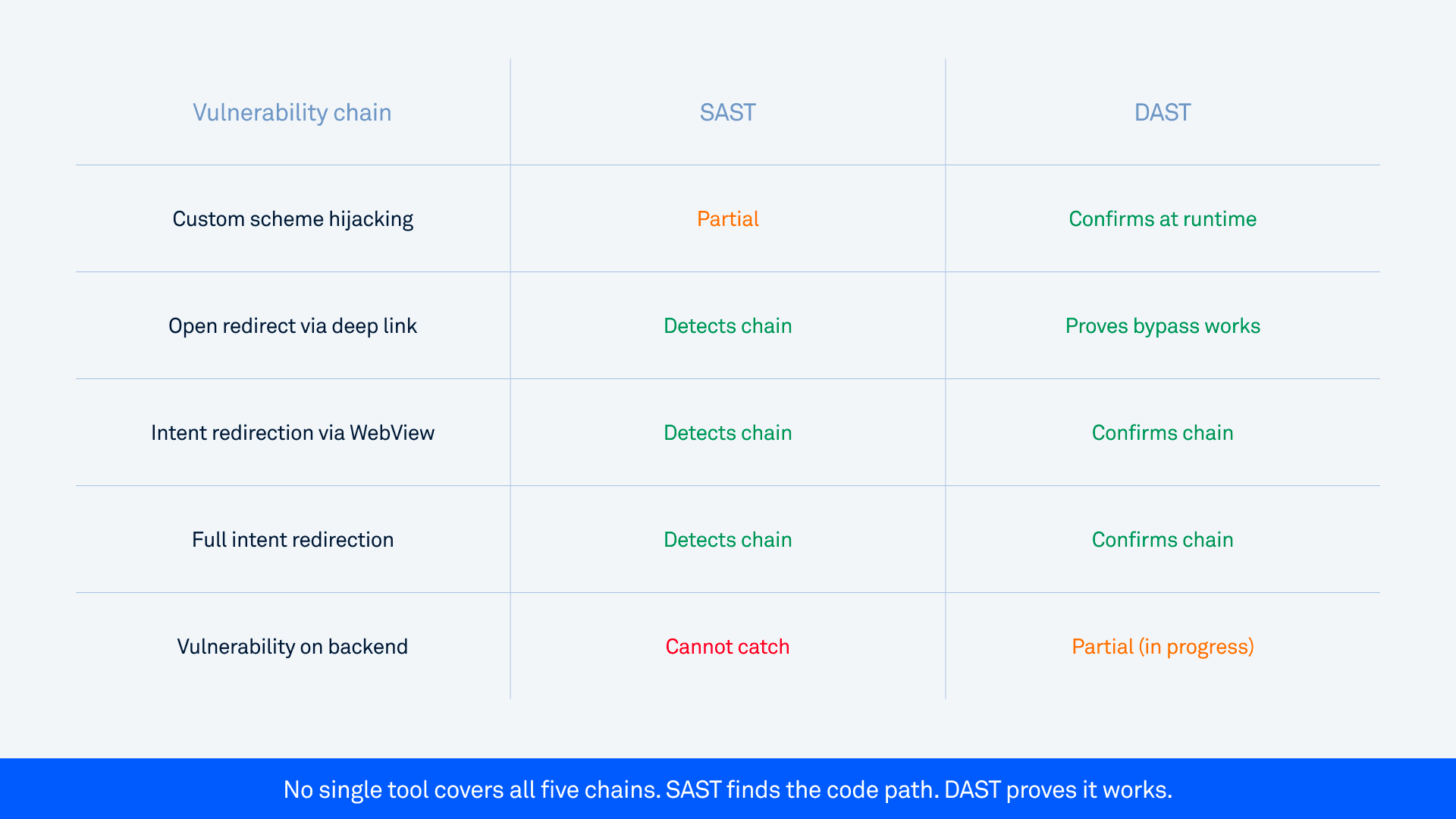
In mobile security testing, SAST traces data flow from deep link sources (URI parameters, Intent extras) to dangerous sinks (WebView URL loading, startActivity()file access, SQL queries). It catches bypassable validation - contains and startsWith URL checks are flagged specifically because they are inadequate for host validation. SAST can also trace internal deep link navigation chains, following data flow across non-exported Activities when the routing logic is visible in static code paths.
What SAST cannot catch:
Expired or compromised whitelist domains. The domain appears valid in code. The vulnerability is in its real-world registration status.
Backend issues, such as a token leak requiring a server-side redirect. The two-hop token leak requires tracing through a server-side redirect.
Runtime disambiguation. Which app handles a given scheme depends on what is installed at the moment.
What DAST adds
DAST operates at runtime. For deep links, it reconstructs the attack surface from Manifest declarations, fuzzes parameters with targeted payloads, and confirms whether a bypass actually works. Not "this might be vulnerable," but the actual exploit producing impact, captured in a screen recording with a full stack trace.
The difference matters: whitelist checks that look secure in code often fail against specific payload patterns. DAST finds those patterns by running them.
One current limitation: backend issues remain difficult to detect automatically. This includes issues that require specific backend conditions in combination with an app issue. This usually also means that pure backend scanning does not detect them either. This is an area we are actively developing.
A note on HierarchicalUri bypass
This attack affects host validation in WebView and is relevant for apps that accept an Uri object controlled by an attacker.
android.net.Uri is an abstract class. One of its subclasses, android.net.Uri$HierarchicalUri, can be constructed via the Java Reflection API to produce a URI that passes host validation checks while actually pointing to a different domain. For example, a URI that returns legitimate.com for getHost() can resolve to attacker.com when passed to webView.loadUrl(). This attack requires a third-party app on the same device that can pass a crafted Uri object to the vulnerable app.
Important: from API level 28 (Android 9), the use of internal interfaces is restricted, though tools like RestrictionBypass can circumvent this. Full technical details are in our blog post: Attack using HierarchicalUri and the Java Reflection API.
This class of vulnerability affected Android versions before Android 12. It is less relevant on modern devices but worth understanding for apps that still support Android 11 and earlier.
Key takeaways: what to check in your app
During Android penetration testing, these six checkpoints are the fastest way to identify deep link exposure in any production app.
Every exported Activity with
BROWSABLEa category. These are reachable from the browser and any installed app.URL parameters flowing into WebView. Look for whitelist bypasses, not just the presence of a check.
getParcelableExtra()on exported components, specifically when the received Parcelable is an Intent object that is then passed directly tostartActivity(). This is the specific condition that creates intent redirection risk.Intent.parseUri()calls downstream of WebView URL loading.OAuth callback schemes. Custom scheme or verified App Link? Check whether the OAuth implementation uses PKCE.
Deep link vulnerabilities rarely exist in isolation. The patterns that lead to account takeover are chains. Security testing that checks individual patterns misses the chains. The dangerous findings are the ones that require tracing three or four steps to reach impact. That is exactly what taint analysis, combined with runtime confirmation, is built to find.
At Oversecured, our scanner covers intent redirection, WebView exploitation chains, OAuth callback hijacking, and 170+ other Android vulnerability categories. SAST runs in 15-20 minutes. DAST confirms exploitability with working PoCs and screen recordings. Start with a free scan.