Guides
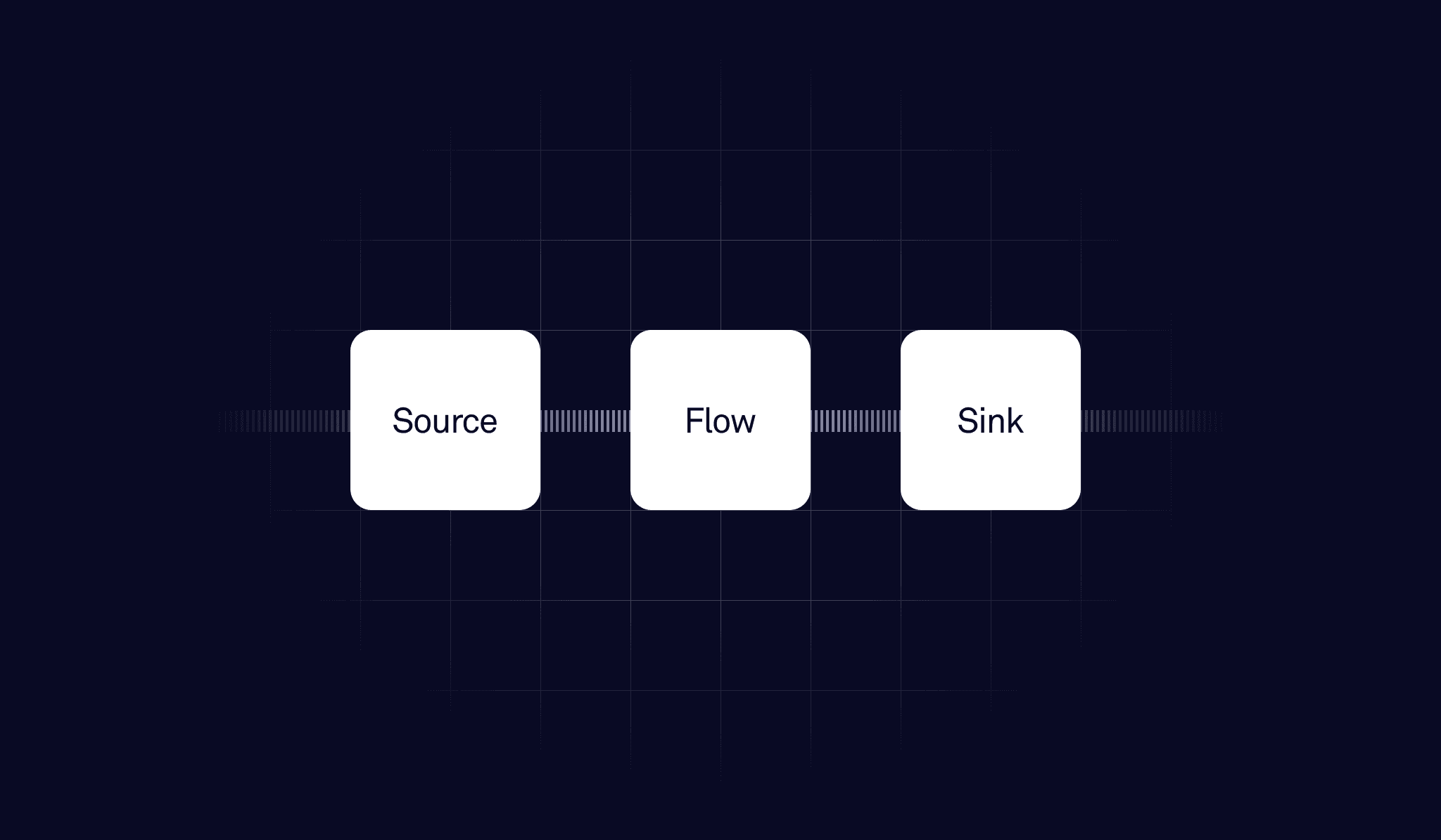
Most mobile security tools scan your app and hand you a list of suspicious lines. A function call that looks dangerous. A string that matches a pattern. A permission that seems too broad.
But a line of code doesn't leak data. A path does.
Taint analysis tracks those paths. It's the difference between flagging that a file operation exists and proving that an attacker can control exactly which file gets read. In this article, we'll explain how taint analysis works, why it catches vulnerabilities that other tools miss, and how Oversecured implements it in practice. We'll also walk through a real vulnerability we found in a Google authentication library using taint analysis — one that Google confirmed and already fixed.
What pattern matching actually does (and where it stops)
The majority of mobile SAST tools, including most open-source scanners, work through pattern matching. They search for known-dangerous function calls, configuration issues, and strings that look like secrets.
But pattern matching is blind to context. It looks at one line of code in isolation. It doesn't know where the data came from, whether it was checked or cleaned up along the way, or what happens to it further down the code. Think of it like a spell-checker that flags a word without reading the sentence around it.
Consider this example:
database.execSQL("DELETE FROM " + tableName);
A pattern-matching tool flags this as SQL injection. It looks dangerous, and it might be. But if earlier in the same function, there is:
if (!tableName.matches("[a-zA-Z_]+")) throw new SecurityException();
Then the input has been validated. There is no vulnerability. The flag is a false positive.
Pattern matching can't see the sanitizer. Taint analysis can. Beyond sanitizers, taint analysis also accounts for reachability, whether a piece of code can actually be reached with malicious input. Pattern matching flags every suspicious call it finds, even code that is never executed in a real attack scenario. Taint analysis only confirms a finding when the full path from source to sink is actually reachable.
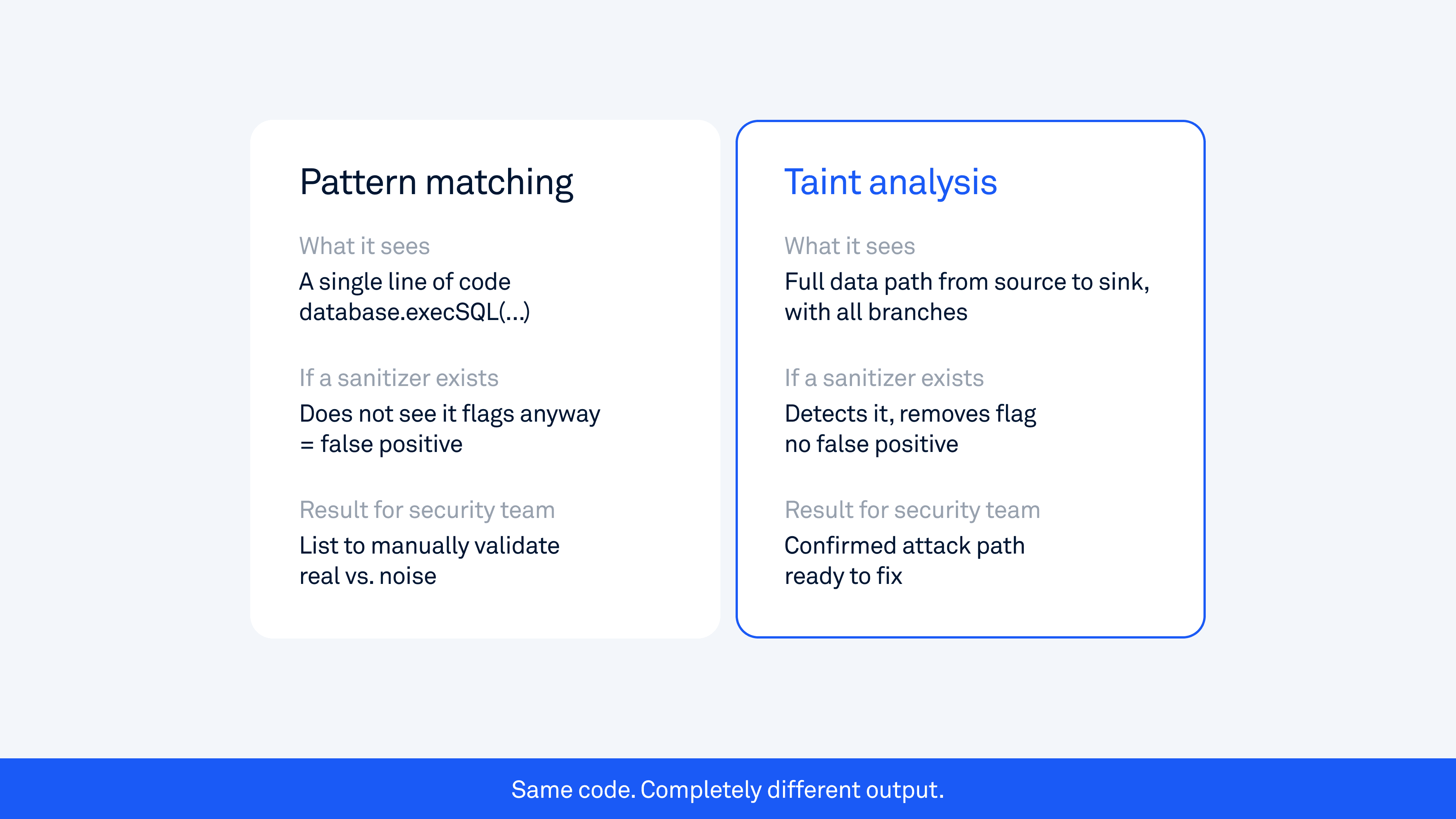
This is why tools like MobSF, while useful for quick scans, tend to generate many false positives and miss complex vulnerabilities that matter most to attackers. They check what a line of code looks like, not what it does.
What taint analysis actually does
Taint analysis, also called data flow analysis, tracks how data moves through an application from the moment it enters to the moment it is used in a potentially dangerous operation.
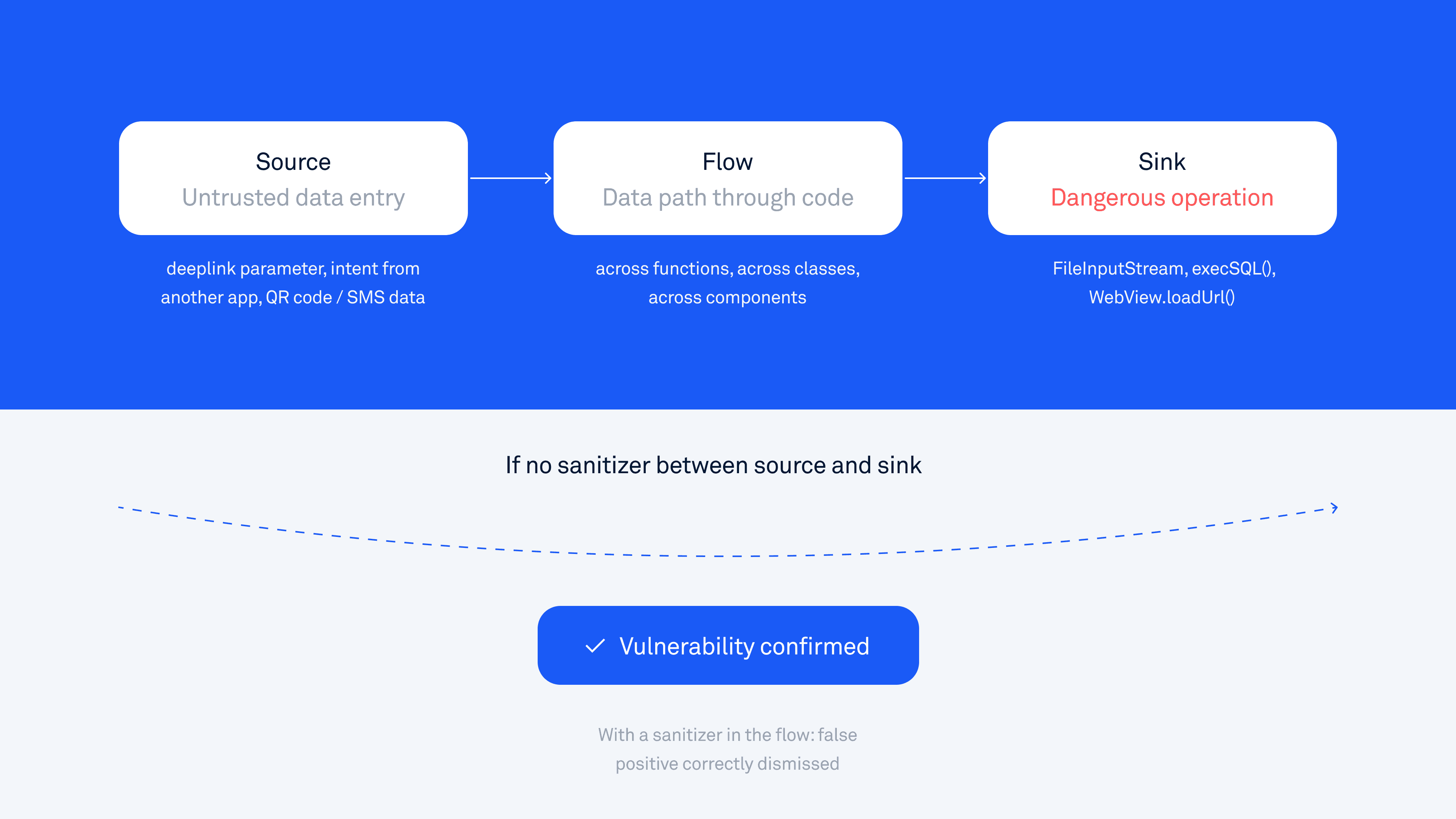
The model has three components:
Source is where untrusted data enters the app. This includes deeplink parameters (URLs that open the app from outside the app), intents sent by other apps, data read from external storage, QR codes, SMS/MMS messages, and local network input. Anything that an attacker could control counts as a source.
Flow is the path the data takes as it moves through the code: across functions, across classes, and sometimes across entirely separate app components. The data might get assigned to a new variable, passed as a parameter, stored in an object field, or transformed along the way. Taint analysis follows all of these steps.
Sink is a dangerous operation where, if tainted (attacker-controlled) data arrives without proper validation, a vulnerability exists. Examples include file read and write operations, database queries, network requests, calls to startActivity(), and calls to WebView.loadUrl().
A vulnerability is confirmed when tainted data reaches a sink with no proper sanitizing step in between.
Here is a simple example to make this concrete:
// SOURCE: attacker-controlled deeplink parameter
String filePath = getIntent().getData().getQueryParameter("file");
// FLOW: data moves through the app
File targetFile = new File(filePath);
// SINK: dangerous file operation with no validation
FileInputStream stream = new FileInputStream(targetFile);
An attacker sends a deeplink like:
myapp://open?file=/data/data/com.targetapp/databases/secret.db
The app follows the path, opens the private database file, and exposes it. Pattern matching sees FileInputStream and might flag it. Taint analysis traces the full path from the deeplink parameter to the file-read operation and confirms that it is exploitable.
This is the core idea behind OWASP's definition of insecure data storage and improper input validation, two of the most common vulnerability categories in mobile apps. Taint analysis is the technique that reliably detects both.
Why cross-component tracking changes everything
In Android, apps are not a single block of code. They are made up of Activities (screens), Services (background processes), BroadcastReceivers (event listeners), and ContentProviders (data sharing interfaces). These components communicate through Intents, which are messages that carry data from one component to another.
This means data can flow not just through a single function or class, but across entirely separate components of the app.
This is where most tools fail. If a tool analyzes each component in isolation, it sees each piece of the chain independently, and nothing looks dangerous. The exported Activity that receives a deeplink just parses a parameter. The internal Activity that performs a file operation receives data from somewhere. Neither component, examined on its own, reveals the vulnerability.
Taint analysis follows data across these component boundaries.
A real attack chain might look like this:
An attacker sends a deeplink to an exported Activity (one that any other app can access)
That Activity parses a URI parameter and forwards it via an Intent to an internal Activity
The internal Activity uses that URI to load a URL into a WebView that has file access enabled
Step 1 looks harmless. Step 2 looks like normal app navigation. Step 3 appears to be a standard WebView configuration. Only when you trace the complete data flow does the vulnerability become visible.
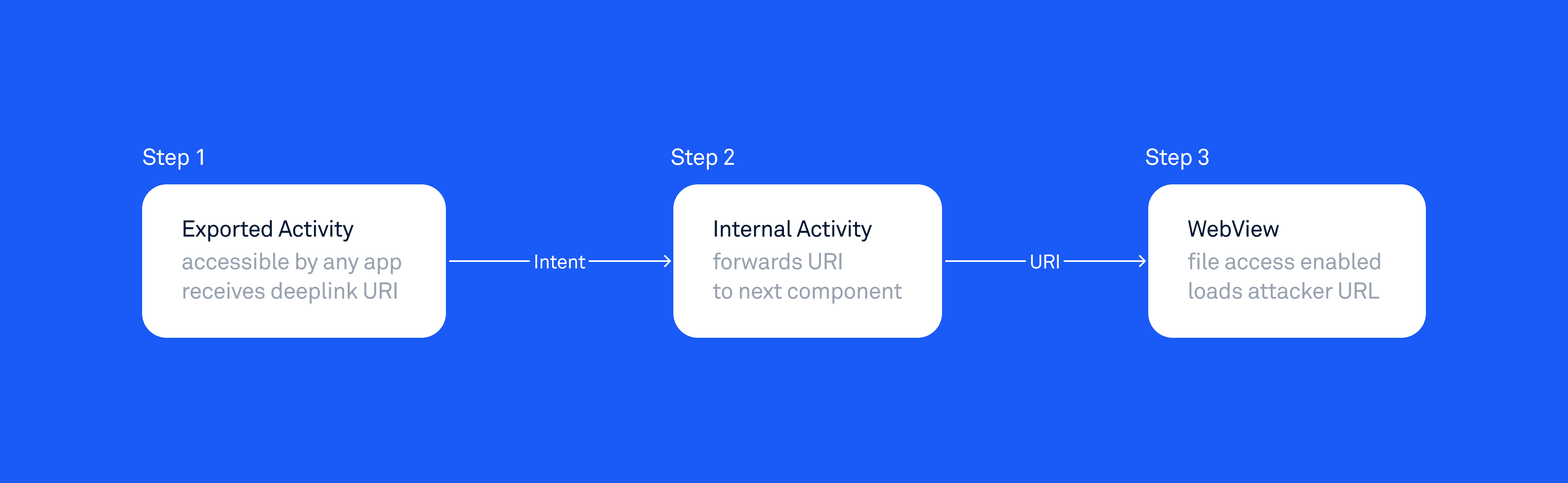
Pattern matching tool | Taint analysis | |
|---|---|---|
What it sees | Step 1: looks harmless | Full path: Step 1 → Step 2 → Step 3 |
Result | False positive or misses it | Confirmed vulnerability |
This is exactly the type of vulnerability that cross-component taint tracking is built to catch. The app launches one specific internal component, but passes attacker-controlled URL data to it without validation. No single component looks dangerous in isolation; only when you trace the full data path across the boundary does the problem become visible. Similar patterns emerge in our research on arbitrary content-provider access. These are not edge cases. They appear consistently in production apps used by millions of people.
The vulnerability classes that require it
The following vulnerability categories are only reliably detected through taint analysis. Pattern-matching tools will either miss them entirely or generate false positives that require significant manual work to validate:
Path traversal and arbitrary file access: attacker-controlled path reaches a file operation. See our Android security checklist: theft of arbitrary files for a detailed breakdown.
Intent redirection: attacker-controlled Intent flows to
startActivity()orstartService(), granting access to protected components.WebView URL injection: attacker-controlled URL reaches
loadUrl()with file access enabled. Our Android security checklist: WebView covers the full range of WebView vulnerabilities.SQL injection: untrusted input reaches
execSQL()or is used in raw query construction.Token interception: authentication tokens flow through an implicit intent that a malicious app can intercept.
HTML and JavaScript injection in WebViews: untrusted data reaches
loadData().SSRF: attacker-controlled URL reaches an outbound network request.
These are not edge cases. They are the vulnerability classes that consistently appear in production apps at scale, across industries and app categories. Our research across hundreds of apps, including Google apps and TikTok, shows the same patterns recurring across different codebases.
How Oversecured's taint analysis works
Oversecured builds a control-flow graph for the entire application and applies taint rules across it. A control flow graph is a map of all the paths code can take during execution, including every branch, loop, and function call. This means the analysis covers not just the happy path, but every possible route the data can travel.
For Android, this means decompiling the APK to Java sources and analyzing all possible execution paths. For iOS, Oversecured accepts Swift sources and applies the same data flow approach.
A few things make this work differently in practice compared to most tools.
No source code required for Android. Oversecured analyzes the compiled APK file, the same binary that runs on user devices. This means third-party SDKs, obfuscated libraries, and vendor-modified framework code are all included in the analysis. Tools that only work with source code miss everything that comes from outside your own repository. This matters a lot in practice: a vulnerability in an ad SDK or analytics library can be just as dangerous as one in your own code, and it shows up in the compiled app regardless.
Flag-based sanitizer modeling. The engine tracks data properties as flags. When a path traversal flag enters the flow, it can be removed if split is applied to the value. But an XSS flag might remain on the same data. This models partial sanitization accurately, rather than treating any validation as fully safe or any unvalidated data as universally dangerous.
Cross-component tracking. Taint flows follow Android IPC (inter-process communication) boundaries across Activities, Services, BroadcastReceivers, and ContentProviders. The full chain is traceable.
Implicit intent simulation. When scanning statically, Oversecured simulates how implicit intents behave at runtime, including startActivityForResult and onActivityResult callbacks. This is important because implicit intents can be intercepted by malicious apps. Our post on interception of Android implicit intents explains this attack class in detail.
The result is a complete scan that covers 180+ vulnerability categories for Android and 80+ for iOS. More importantly, findings reflect actual attack paths, not pattern matches that need manual triage to determine whether they are real.
Real examples from production apps
Google Auth Library for Java
In a recent disclosure, Oversecured found a vulnerability in Google's com.google.auth.oauth2 library, one of the most widely used authentication libraries in Android development. Google confirmed the issue, paid a $3,133.70 bounty, and issued a fix.
The vulnerability was found in three credential classes: ComputeEngineCredentials, ServiceAccountCredentials, and UserCredentials. Each class stores a field called transportFactoryClassName, a plain string that names the transport factory class to use.
Because these classes implement Serializable, they can be sent across process boundaries with attacker-controlled field values. When the object is deserialized, readObject() is called automatically, which passes the transportFactoryClassName directly to Class.forName().newInstance(), loading and instantiating the class the attacker supplied.
What makes this particularly dangerous in the Android context is that all Serializable and Parcelable classes in an app can be deserialized from an Intent, even if those classes are not intended to be used that way. This means that in most cases, simply importing this library is enough to introduce the vulnerability. The app cannot check whether the correct class was deserialized until deserialization has already been performed, which means all Serializable classes automatically become part of the attack surface."
This is a classic taint analysis finding:
Source: transportFactoryClassName field in a Serializable object, controllable by an attacker
Flow: readObject() passes the field value to OAuth2Credentials.newInstance()
Sink: Class.forName(str).newInstance(), arbitrary class instantiation
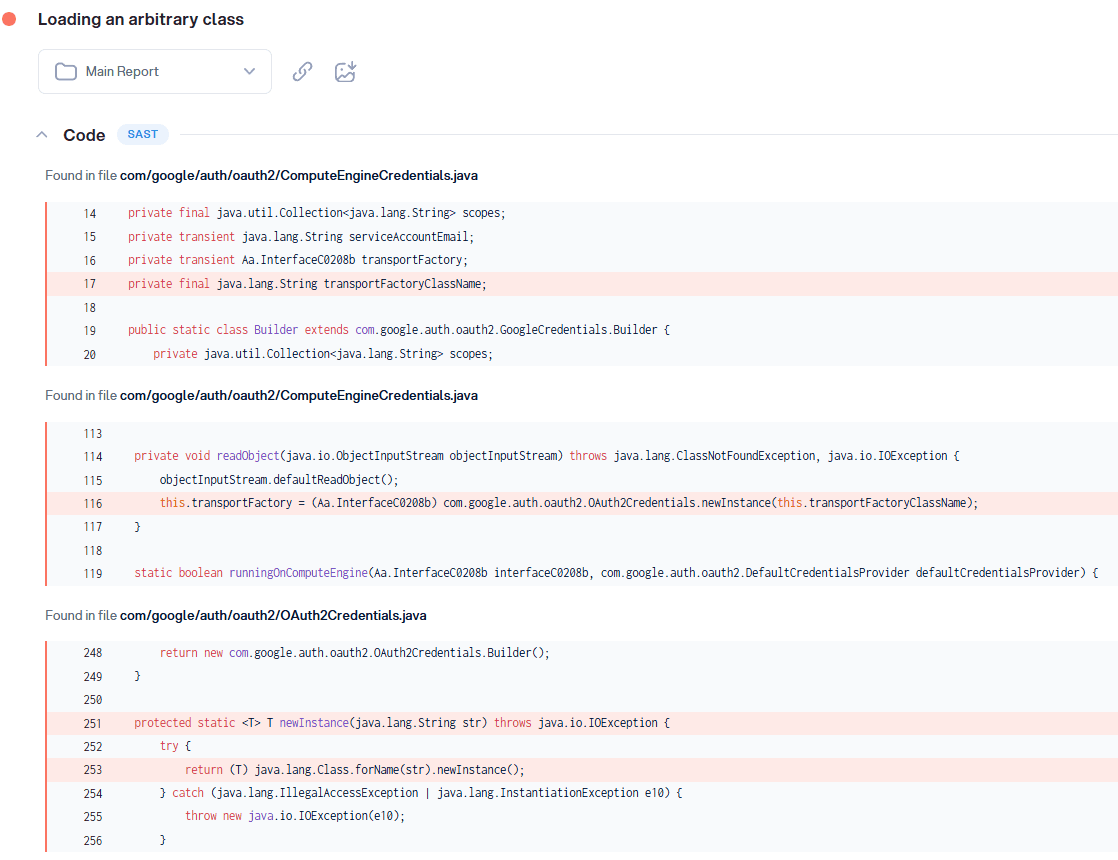
Pattern matching would flag Class.forName() as suspicious. Taint analysis goes further: it traces the full path from the attacker-controlled field through deserialization to the dangerous sink, and confirms the finding across all three affected classes in a single scan. There were three instances of the same issue, all using the same parent class OAuth2Credentials.java, so the same flow was detected in three different classes.
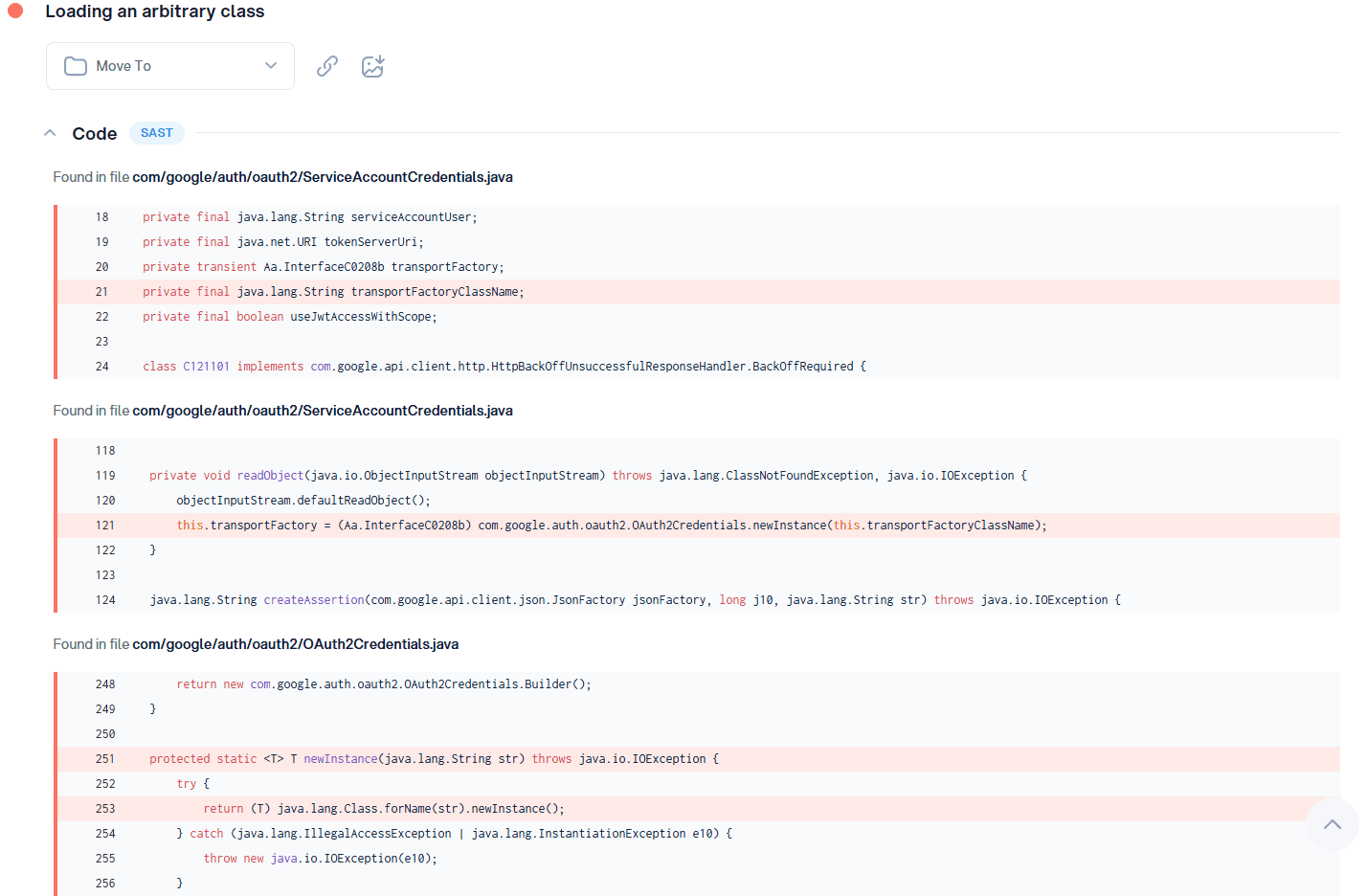
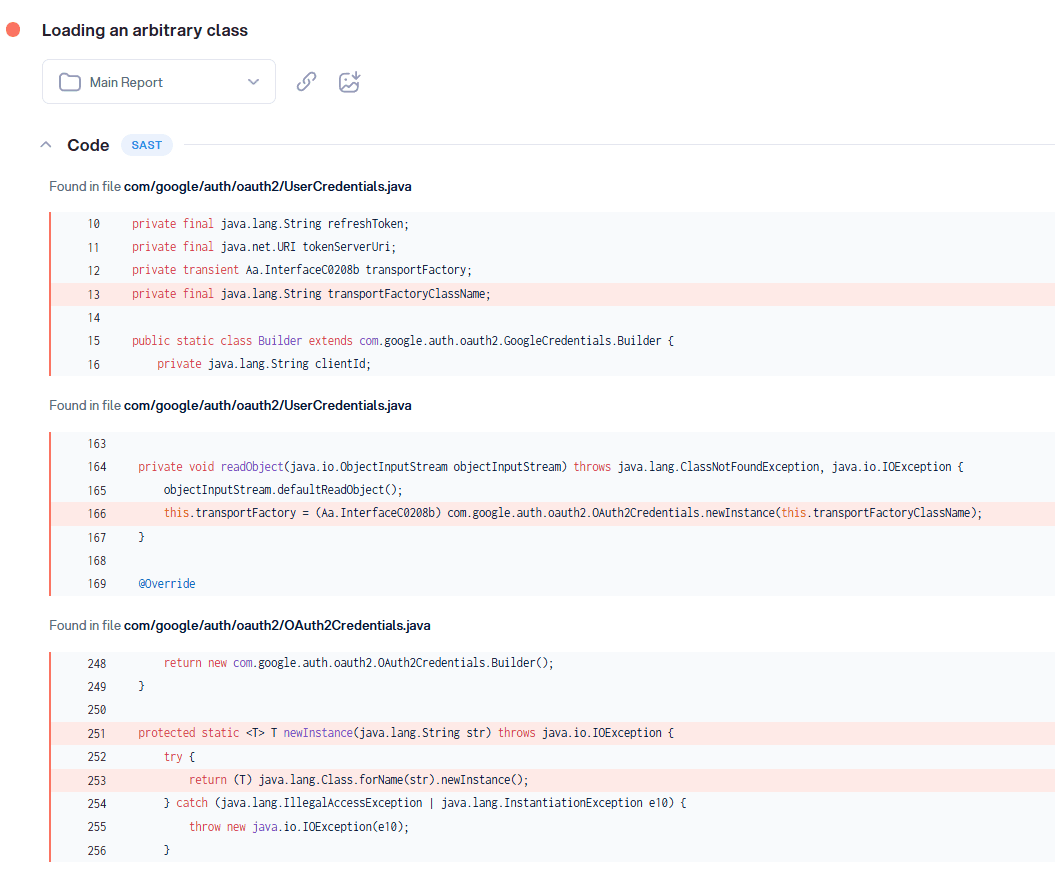
The fix is publicly available: GitHub commit.
What this means for security teams
The practical difference between taint analysis and pattern matching is not just about finding more vulnerabilities. It is about finding the right ones and being confident enough in the results to act on them immediately.
High false positive rates are not just annoying. They erode trust in the tool over time. When developers see ten alerts, and nine turn out to be noise, they start ignoring the tenth. Real vulnerabilities get dismissed because the signal-to-noise ratio is too low. Security becomes a checkbox rather than a real defense.
Taint analysis changes the economics of security review. When every finding includes the full data flow path, showing the source, the flow, and the sink, the developer sees exactly what is happening and why it matters. There is no "is this actually exploitable?" discussion. The answer is already in the report.
For security teams running CI/CD pipelines with frequent release cycles, this difference is significant. A tool that generates homework slows the whole team down. A tool that generates confirmed, exploitable findings with clear remediation paths allows teams to move fast without reducing coverage.
NIST's guidelines on secure software development and OWASP's Mobile Security Testing Guide both emphasize integrating security testing into the development process early. Taint analysis is what makes that practical at the speed modern mobile teams work.
Taint analysis does not just find more vulnerabilities. It finds the ones that matter: the complete attack paths that lead to real data exposure.
The gap between "this function call looks suspicious" and "an attacker can use this deeplink to read your users' private database" is the gap between pattern matching and taint analysis. One generates a list to investigate. The other generates a confirmed attack path to fix.
At Oversecured, taint analysis is central to how we approach mobile app security testing. It is combined with cross-component tracking, compiled APK analysis, and a rulebase built from real-world exploitation research across hundreds of production apps, including our published findings from Google, Samsung, and Xiaomi.
If you want to see what taint analysis finds in your app, run a free scan.