Guides

When a scanner launches your banking app and hits the login prompt, it has two options: get past it, or stop. The majority stop. They probe exported components, check TLS configuration, and fuzz publicly reachable deeplinks - all before a single credential has been entered. Then they generate a report.
The problem is that for most apps - fintech and healthcare - 80-90% of the real attack surface lives behind authentication. Payment flows, transaction history, therapy notes, insurance records: none of it is reachable without a valid session. Mobile app security testing that can't get past the login screen isn't testing most of the app.
This article covers what comprehensive mobile app security testing looks like in authenticated flows: why authentication is a harder problem on mobile than on the web, which vulnerability categories only appear post-login, and which app categories carry the most risk when dynamic testing stops at the login screen.
Why authentication is a different problem on mobile
Web security testing handles authentication simply: replay a session cookie or HTTP header with every request. Configure once, done. The scanner doesn't need to understand the UI at all.
Mobile app security testing doesn't work that way. There's no stateless session to replay. To reach authenticated screens, a scanner has to navigate the app as a user: tap fields, enter credentials, handle multi-step flows, respond to OTP prompts, dismiss biometric dialogs, and confirm that authentication succeeded. Every app does this differently. The core challenge is that mobile UI is fundamentally less accessible to automation than web: on the web, the page structure is always HTML, analyzable via a simple HTTP request. On mobile, there is no equivalent - every app renders its own interface, and a scanner has to interact with it visually, the way a human would. This is not a fully solved problem on the web either, but the structural accessibility of HTML makes web login automation significantly more tractable.
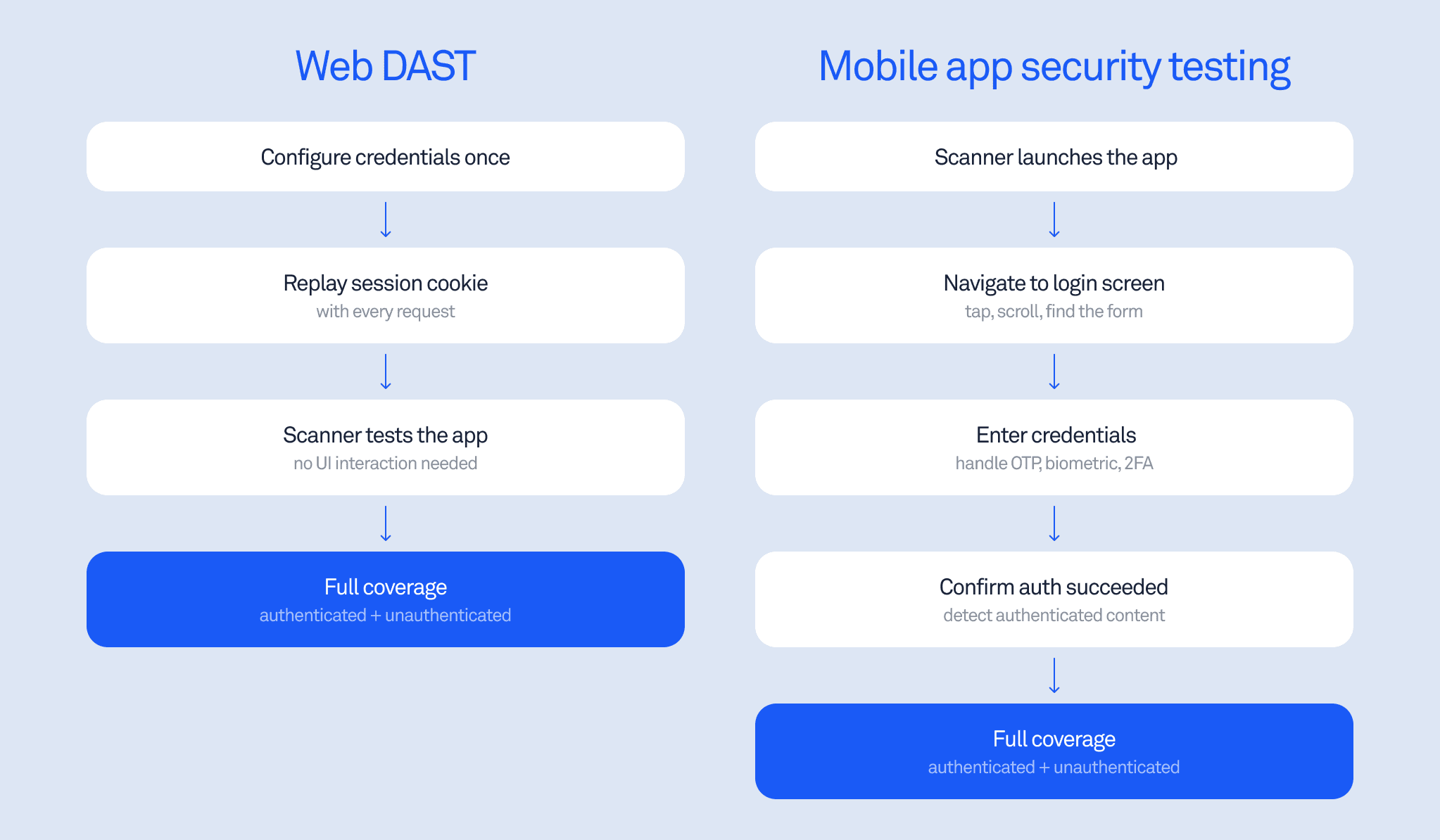
This is why authenticated mobile security testing has historically required manual setup. Security teams write per-app scripts to handle each unique auth flow, maintain those scripts as the app UI changes with every release, and end up spending more time fixing automation than finding vulnerabilities.
The consequence is predictable: most enterprise security teams either skip dynamic testing of authenticated flows entirely or run it only on a small subset of apps where the configuration overhead is manageable. NIST SP 800-163, the federal standard for mobile application vetting, specifies that a robust assessment process must combine both static and dynamic analysis - dynamic testing installs the app on an emulator and observes its runtime behavior. In practice, dynamic testing is the step most commonly skipped.
How automated login works in mobile security testing
The approach that removes per-app configuration overhead is a vision-language model in a control loop: a login agent that receives a screenshot at each step and decides what action to take next.
At each step, the agent receives:
A screenshot of the current screen
Optionally, the accessibility tree via ADB (more reliable than OCR alone for element targeting)
The last 2-3 screenshots for continuity context
The credentials to inject:
{email}, {password}
The agent outputs a structured decision at every step:
{ "screen_type": "login | otp_verification | content/home | ...",
"progress": "yes|no|same",
"confidence": "high|medium|low",
"reasoning": "one sentence why this action",
"action": { "type": "...", ... } }
Before acting, the agent classifies the current screen:
splash | onboarding | permission_dialog | login | registration |
otp_verification | content/home | error | popup/modal | unknown
This matters because the agent needs to distinguish a registration screen from a login screen, a loading spinner from an authenticated home screen, a permission dialog from an error state.
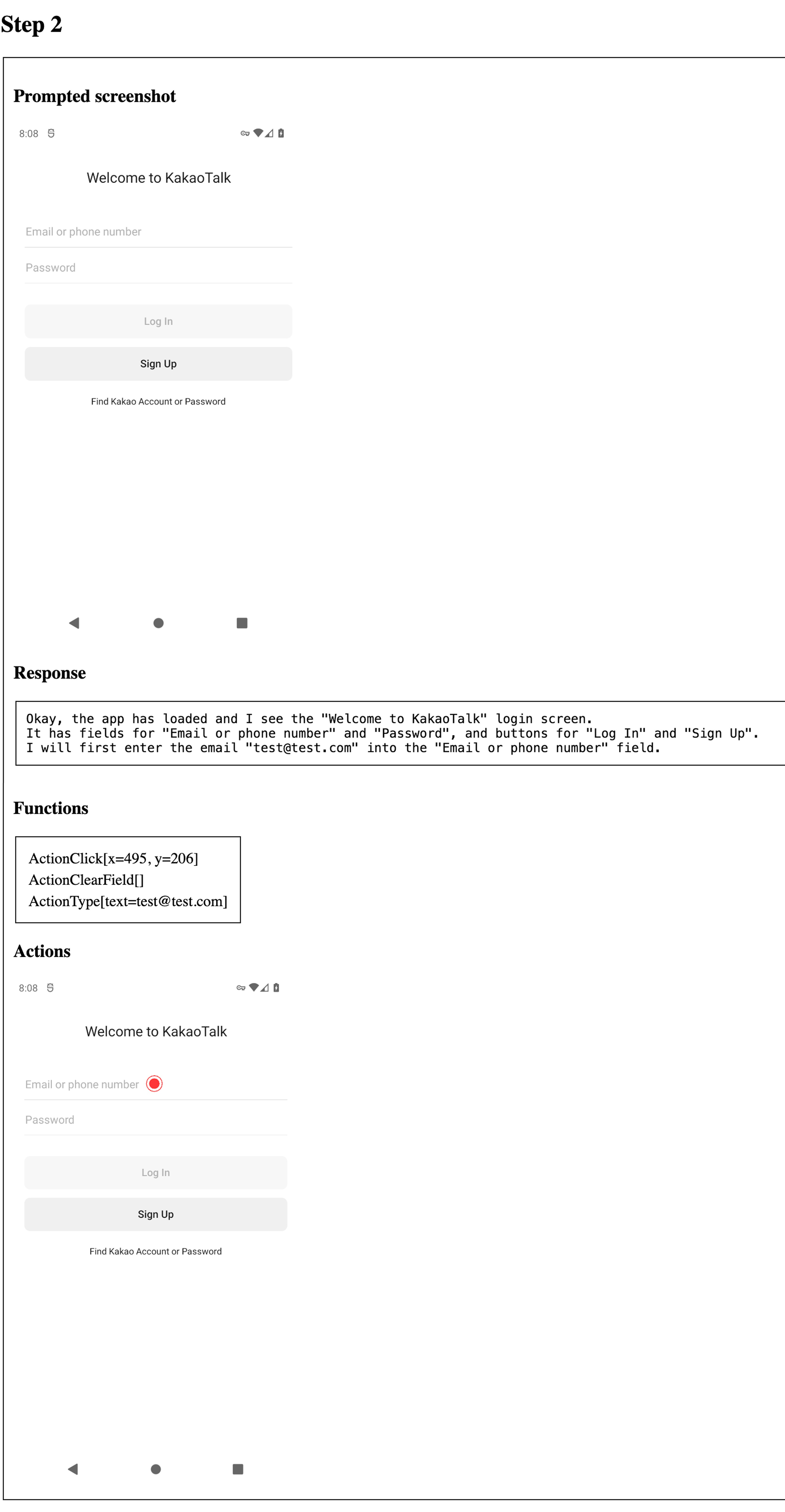
The login agent identifies a standard login screen, classifies it, and executes the credential entry sequence - all without per-app configuration.
Authentication methods the agent handles:
Method | Behavior |
|---|---|
Username/password (single screen) | Type email, type password, tap primary button |
Email-first flows (multi-screen) | Handle each screen independently |
OTP / 2FA | Call get_otp(), enter code, submit |
Biometric (Face ID, fingerprint) | Dismiss - tap "Use password instead." |
Social login / SSO | Excluded from scope |
CAPTCHA | Immediate failed("CAPTCHA") - no bypass |
When the login screen isn't immediately visible, the agent follows a six-step escalation: look for sign-in text or icons, tap the rightmost bottom tab bar item, check the top-right corner for an avatar, open hamburger/sidebar menu, scroll down, tap the primary CTA. It will find the login screen in any standard app navigation pattern.
Anti-loop protection prevents getting stuck: same screen after 2 attempts triggers a different action, after 4 attempts triggers system Back, after 5 failed attempts returns failed("STUCK"), and a 40-step total limit returns failed("TIMEOUT").
Success requires all three: credentials entered, the login screen no longer visible, and authenticated content visible. The agent has hard bans on destructive actions: it will never tap Sign Out, Delete, or Deactivate, and does not currently handle registration or password reset flows.
What mobile app security testing finds after login
Once a scanner has an authenticated session, it gains access to code paths that static analysis can identify but can't confirm without runtime execution.
The combined SAST + DAST flow works like this: static analysis identifies candidate code paths and potential vulnerabilities during the build. The dynamic engine then instruments those paths with runtime breakpoints and attempts to trigger them against the live app. For exported components and deeplinks, the scanner collects all inputs and fuzzes them with payloads at runtime. Post-login, this same instrumentation applies to the authenticated surface - the part of the app that actually processes sensitive data.
Vulnerability categories that only appear in authenticated mobile app security testing:
Session management issues (token handling, session fixation) that require a valid session to observe
WebView vulnerabilities with authenticated content loaded - token theft via JavaScript bridges only fires when a session exists
Data exfiltration paths that require an active session to trigger
Any vulnerability that exists in a component that is only accessible after login
Runtime configuration problems that only manifest when the app is operating normally
Root detection bypass behavior in live authenticated contexts
Evidence quality is also substantially different. Stack traces from authenticated DAST runs capture actual runtime values - not just the code structure, but the real session tokens, user identifiers, and data being processed at the moment of exploitation. If a session token was intercepted, the stack trace shows the actual token value.
Consider the attack chain described in Android: Access to app-protected components: an exported proxy activity passes a nested Intent to a non-exported AuthWebViewActivity, which loads a URL from the intent parameter and attaches the user's session to the HTTP request. SAST can identify this code path statically. With an authenticated DAST session, the scanner can actively trigger it and capture the actual token being sent to an attacker-controlled server - confirming exploitability rather than just flagging the pattern.
Deeplink security testing in authenticated sessions
Deeplinks are a significant attack surface in mobile app security testing. A dynamic scanner fuzzes deeplink handlers with thousands of malicious payloads at runtime, with static taint analysis tracking data flow from handler to dangerous methods.
A direct example:
Deeplink: myapp://open?file=/data/data/com.myapp/secret.db
Result: App copies internal database to public storage -> attacker reads it
In authenticated flows, deeplinks that trigger account actions become a more serious target. A deeplink that initiates a funds transfer, modifies account settings, or accesses private data can only be meaningfully tested when the scanner holds a valid session. Without authentication, the app either ignores the deeplink or redirects to the login screen - the interesting behavior never fires.
The combination of deeplink fuzzing and taint analysis separates pattern-matching from actual vulnerability confirmation. As covered in Android security checklist: theft of arbitrary files, the most dangerous file theft vulnerabilities involve data flowing from a deeplink handler through a content provider to public storage. Taint analysis tracks the full path; runtime testing with an authenticated session proves it's exploitable.
Where the risk concentrates: fintech and healthcare
Fintech and healthcare apps have something in common: the data and functionality that matter most are entirely behind authentication. The consequences of a missed vulnerability in either category are severe.
Fintech apps
In practice, security teams at fintech companies consistently report the same gap: their DAST coverage ends at the login screen, which means payment flows and account management - the highest-risk surfaces - go untested dynamically.
For a fintech company, the mobile app is often the only channel. It handles the highest-trust operations a user performs: payments, transfers, identity verification, and account management.
Fintech apps increasingly serve as the highest authentication layer: device binding, biometric verification, and in-app KYC. If mobile app security fails here, the identity verification framework collapses, and downstream transactions become fraudulent.
The attack surface that matters is entirely post-login: authenticated WebViews handling payment flows, Intent handlers processing transaction data, and session tokens for high-privilege operations. A mobile app security testing process that stops at the login screen has tested none of this.
Healthcare apps
Healthcare apps store data that can't be changed after a breach: therapy session notes, diagnostic history, medication records, and mood tracking data.
Oversecured's research on mental health apps found authentication tokens exposed through WebView JavaScript bridges - exploitable by an attacker who loads an arbitrary URL into the WebView after authentication. Authenticated DAST makes it significantly easier to detect and confirm such issues, actively triggering the vulnerable code path and capturing evidence of exploitation.
The regulatory consequences are significant: HIPAA breach notifications, the nature of the data, and the trust relationship between patient and provider make healthcare apps a particularly high-consequence target for incomplete mobile security testing.
What automated testing covers vs. what still needs manual review
Not all vulnerabilities are reachable the same way - and the testing program should reflect that.
Being precise about coverage matters for building a realistic mobile app security testing program.
What dynamic testing confirms automatically:
Vulnerabilities in exported components reachable from authenticated sessions
Deeplink fuzzing with taint-tracked payloads against authenticated handlers
Runtime confirmation of SAST-identified code paths, triggered with a live session
Concrete evidence: ADB command PoCs, crafted deeplinks, stack traces with real captured values, screencasts of exploitation
What still requires manual testing:
Business logic flaws: whether user A can access user B's data requires understanding intent, not just code execution
Complex multi-step attack chains that depend on app-specific state
Compliance requirements that specifically mandate human review
The OWASP Mobile Application Security Testing Guide places business logic testing in the manual category for similar reasons: automated tools confirm that a vulnerability exists and is exploitable, but determining whether a permission boundary has been violated requires understanding what that boundary is supposed to enforce.
Automated mobile app security testing with authenticated coverage handles the class of vulnerabilities that are definable and detectable at runtime - deeplink exploits, session token theft via WebViews and Intent redirection, exported component abuse, and runtime misconfigurations. Manual testing covers what requires judgment about intended behavior.
What a finding looks like
A confirmed finding looks like this:
PoC: A concrete, runnable artifact - an ADB command, a crafted deeplink, or a malicious code snippet. Not "this code path could lead to exploitation" but the actual command that demonstrates it.
Stack trace with live values: The call chain from the vulnerable entry point to the dangerous operation, with real variable values captured during the run. If a session token was intercepted, the trace shows the actual token.
Screencast: A recording of the exploitation being triggered. For a token interception chain via Intent redirection -> WebView -> attacker server, the recording shows the full sequence.
This is the difference between a finding that requires hours of validation and one that requires only a fix.
The gap in most mobile app security testing programs
A standard dynamic scan against an unauthenticated session will find exported component vulnerabilities, TLS misconfigurations, publicly reachable deeplink handlers, and accessible data. This is real coverage, and it matters.
But for applications where sensitive operations live behind authentication - which is most banking apps, most healthcare apps, most apps where a breach has meaningful consequences - unauthenticated testing is checking the door lock while the windows are open.
Complete mobile app security testing means scanning with an authenticated session, using runtime instrumentation on statically-identified code paths, and generating proof-of-concept evidence. That's the difference between knowing a vulnerability exists and knowing exactly how an attacker would use it.
Want to see what authenticated testing surfaces in your app? Run a free scan.