Guides
To integrate mobile app security testing into your CI/CD pipeline without slowing releases: run SAST on every pull request (PR), enforce a hard-block/warn/log gate policy, and add DAST as a nightly pre-release gate. This guide covers the exact integrations, policy logic, and rollout plan.
Most teams treat mobile security as a final checkpoint. Run a scan before launch, fix what's flagged, ship it. The problem: by that point, fixing a critical vulnerability means delaying the release, redoing QA, and explaining to the business why the app is late.
The better model is shifting security left: embedding it into your CI/CD pipeline. Hence, it runs automatically, fails fast on real issues, and stays out of the way when there's nothing to worry about.
Why is mobile application security harder to automate than web?
Web vulnerabilities are usually server-side. You patch the server. The fix is live for every user immediately: no app store approval, no waiting for users to update.
Mobile doesn't work that way. Your app lives on user devices. After a vulnerability is patched and a new version ships:
Only 40-50% of users update in the first month
Some apps see update rates as low as 5-15%
Critical vulnerabilities can stay on user devices for 180+ days after the fix
That's the real argument for shifting security left: find it before it ships, because fixing it after is expensive and slow.
The threat landscape backs this up. According to the 2025 Verizon Data Breach Investigations Report, 30% of breaches now involve third-party software (up 2x year-over-year), and 20% involve device vulnerabilities (up 34%). Both trends point directly at the mobile app attack surface.
There's a second reason mobile CI/CD security is harder: the tooling gap. Web DAST tools are mature and widely integrated. Mobile security testing tools are still catching up. Most either scan only the surface or require so much manual configuration that teams abandon them before the first sprint is over.
What security gates actually mean for mobile
A security gate is a policy-enforced checkpoint in your pipeline that can block, warn, or alert based on what a security scan finds.
Policy-enforced is the keyword. A scan that runs but never blocks anything isn't a gate; it's theater.
In practice, mobile security gates work on three levels:
Hard blocks (fail the build)
Reserved for findings that are unambiguous and critical. Note: hard blocks work well when security and dev teams share ownership of the pipeline. In risk-based organizations where security advises but doesn't control dev teams, consider using warnings with escalation paths instead of hard blocks. Hardcoded credentials or API keys in the APK
Exported sensitive components with no permission validation
Authentication token stored in plaintext
Attacker-controlled data flowing to sensitive actions (arbitrary component launch, file access)
If any of these appear, the build fails. No exceptions, no manual override without security sign-off.
Warnings (flag but don't block)
For findings that need review but may have context:
Third-party SDK flagged for a known vulnerability category
Deprecated cryptographic algorithm in a non-critical path
Potential deeplink issue that requires manual verification
Informational (log and track)
Findings below a severity threshold, tracked over time. Useful for spotting patterns: if the same class of issue keeps appearing in new code, something in the development process needs fixing upstream.
The mistake most teams make is treating all findings as equally urgent. A high volume of findings (especially low-severity ones without a clear business context) overwhelms developers and makes it hard to prioritize what actually matters. A well-designed gate policy handles prioritization at the policy level, so developers see only what needs their attention.
For a practical reference on which vulnerability categories belong at which severity level, OWASP MASVS 2.0 provides a solid baseline covering storage (MASVS-STORAGE), cryptography (MASVS-CRYPTO), and network controls that map directly to gate criteria.
How to integrate mobile app security testing into your CI/CD pipeline
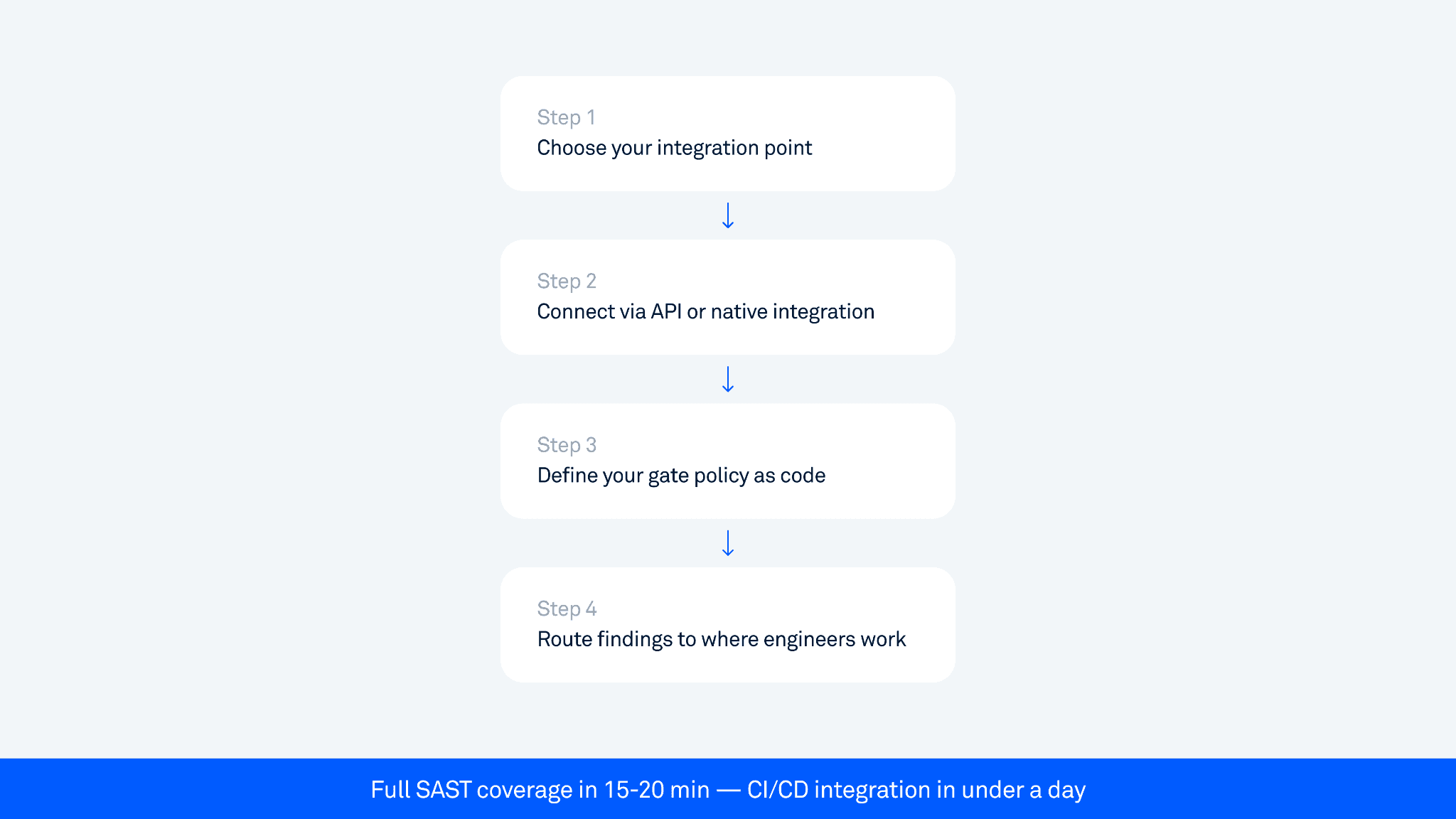
Step 1: Choose your integration point
For most teams, the right place to run SAST is on every pull request that touches mobile code. Running it only on the main branch or release candidates is too late.
Typical setup:
PR trigger: run SAST on every PR to main or release branches
Release candidate scan: run DAST, verification, and fuzzing after the full build and before creating a release.
Pre-release gate: mandatory pass before any build is promoted to staging or production
Step 2: Connect via API or native integration
According to the JetBrains State of CI/CD Survey 2025, GitHub Actions is used by 62% of developers for personal projects and 41% in organizations. Most major platforms (GitHub Actions, GitLab CI, Jenkins, Bitrise) support security tool integration through plugins or API.
Oversecured supports all major platforms through REST API, native plugins, and CLI. Basic integration (connecting the scanner and configuring a scan trigger) is straightforward and can be done in a single session. Advanced setup with custom release blocking, Jira, and Slack routing takes longer depending on your pipeline complexity.
Step 3: Define your gate policy as code
Don't configure policies in a GUI that only one person knows about. Commit your gate policy to the repo alongside your code — this makes it reviewable, auditable, and version-controlled. When a compliance team asks what security gates were active on a given release, you can answer precisely.
Step 4: Route findings to where engineers already work
GitHub/GitLab: inline PR comments on the specific file and line
Jira: automatic ticket creation for warnings and above
Slack: alert to #security-alerts for critical findings
The goal is zero additional steps for engineers. The finding shows up in the PR review. They fix it. Done.
Will this slow our releases?
Most enterprise mobile teams release on bi-weekly or 3-week cycles, targeting weekly. At that cadence, even a 30-minute scan on every PR would be tolerable, but it creates pressure to skip the gate when deadlines approach. The target for PR-level SAST is under 20 minutes.
Oversecured delivers full SAST results in 15-20 minutes. That fits comfortably within normal PR review cycles.
Design decisions that keep scans from slowing things down:
Run scans asynchronously. The PR doesn't wait for the scan to complete before it can be reviewed. The scan runs in parallel, result is posted before the merge.
Set a timeout policy. If a scan doesn't complete within X minutes, treat it as a warning, not a block. Don't let an infrastructure issue hold up a release.
Use incremental scanning. Cache previous analysis and only scan changed code paths on PRs. Full scans run nightly.
Separate DAST from the PR gate. DAST takes longer (typically 2+ hours for a full scan) and shouldn't block individual PRs. Run it as a nightly job or pre-release gate.
DAST in CI/CD: the harder problem
SAST is relatively straightforward to automate: you submit a binary, and get back a list of findings. DAST is harder because it requires the app to actually run.
The challenges:
Emulator infrastructure: running Android emulators in the cloud at scale is expensive and slow. Oversecured runs DAST in a controlled emulated environment with root detection bypass and attestation bypass enabled - no physical device required.
Authentication: most enterprise apps have login screens. DAST can't reach 80-90% of app functionality without getting past authentication, and every app has a different login flow.
For authentication, the emerging solution is LLM-powered navigation agents that automatically navigate any app's login flow: standard username/password, OTP/2FA, biometric prompts, and non-English UIs, all without per-app configuration. We cover this in detail in Mobile app security testing beyond the login screen.
For false positives, the right architecture is automatic proof-of-concept generation: findings come with evidence that helps teams validate and prioritize them quickly, rather than spending weeks on manual triage. Oversecured DAST findings include proof-of-concept evidence: PoC commands, runtime stack traces, and screencasts where applicable. The exact combination depends on the vulnerability type.
What to scan: beyond source code
Teams consistently get this wrong: they scan their source code and assume that's the whole picture.
What ships to users is the compiled APK or IPA, including every third-party SDK, dependency, and library bundled in. In many enterprise apps, 70-80% of the code by volume is third-party.
A common pattern we see across enterprise apps: internal code is clean, but a misconfigured WebView in a third-party ad SDK gives external content full access to the app's context. The vulnerability isn't in anything the team wrote; it's in a dependency they added and never audited.
This is why good mobile app security testing scans the compiled binary, not just the source:
Analysis works without source code (critical for Android APK scanning)
Third-party SDK vulnerabilities are caught
Obfuscated code is analyzed correctly through deep taint/dataflow analysis
The attack surface matches what an attacker would actually reverse-engineer
For a deeper look at how taint analysis finds real data-leak paths that pattern-matching tools miss, see Inside mobile taint analysis: how source-to-sink tracking finds real data-leak paths.
Practical gate policy: what blocks vs. what doesn't
The table below maps examples from Oversecured's 176 Android vulnerability categories to gate actions. This is a representative starting point. Your policy should reflect your app's risk profile.
Finding type | Severity | Gate action |
|---|---|---|
Hardcoded password or token | Critical | Hard block |
Hardcoded cryptographic key | Critical | Hard block |
Arbitrary code execution via Java Reflection APIs | Critical | Hard block |
Arbitrary code execution via third-party package contexts | Critical | Hard block |
OS commanding | Critical | Hard block |
SQL injection | Critical | Hard block |
Memory corruption via JSON/XML parsers | Critical | Hard block |
Intent redirection | High | Warn + ticket |
Theft of arbitrary files via ContentProviders | High | Warn + ticket |
Theft of arbitrary files via JavaScript interfaces | High | Warn + ticket |
Cross-site scripting in a WebView | High | Warn + ticket |
Universal cross-site scripting | High | Warn + ticket |
Misconfigured Google Firebase | High | Warn + ticket |
Overwriting arbitrary files via attacker-controlled output file paths | High | Warn + ticket |
Logging sensitive data | Medium | Warn |
Password storage on the device | Medium | Warn |
Insecure use of biometric authentication | Medium | Warn |
Allowing network cleartext communications | Medium | Warn |
Vulnerable SSL/TLS implementation | Medium | Warn |
Remote WebView debugging is enabled | Medium | Warn |
File access from file URLs is enabled for WebView | Medium | Warn |
Exported activity/service/broadcast receiver | Low | Log + track |
Weak cryptographic algorithms | Low | Log + track |
Weak SSL/TLS ciphers | Low | Log + track |
Missing V2 application signature | Low | Log + track |
Dynamic code loading | Low | Log + track |
Keep the hard block list short and non-negotiable. Adding too many items to the hard block category creates pressure to disable the gate entirely.
Common integration mistakes to avoid
Scanning too late. Integrating security into the release gate only means you find issues after the code is already merged and QA'd.
Ignoring the feedback loop. If engineers don't know why a finding is a problem or how to fix it, they'll work around the gate or escalate everything to security for manual triage.
Treating DAST like SAST. DAST requires a running app, proper emulator infrastructure, and longer scan windows. Forcing DAST into the PR gate causes constant timeouts.
Not versioning your gate policies. If your gate policy lives only in a UI configuration panel, you lose auditability.
Relying entirely on open-source mobile security testing tools. Tools like MobSF catch 20-25% of vulnerability types and generate false positive rates of 30-50%. They're a starting point, not a gate policy foundation.
The compliance angle: what auditors actually want to see
For security and engineering leads at regulated companies, mobile application security in CI/CD isn't just about finding vulnerabilities. It's about demonstrating process.
What auditors typically want:
Evidence that security scanning runs on every release, not just once a quarter
Documented gate policy: what gets blocked, warned, tracked
Remediation records: how findings were addressed and when
Coverage statement: which standards does your scanning address?
Oversecured maps all 175+ Android vulnerability categories to 53 compliance standards, including OWASP Mobile, MASVS, NIST, and PCI DSS. Every scan run is logged. Every blocked build is recorded. Every finding gets a ticket with status tracking.
A well-integrated CI/CD security pipeline generates this audit trail automatically. You don't prepare for the audit; you already have the evidence.
A realistic rollout plan
Phase 1 (Week 1-2): Integrate and observe. Connect SAST to the pipeline in warning-only mode. No blocks, no tickets. Run scans and understand your baseline.
Phase 2 (Week 3-4): Define your gate policy. Based on Phase 1 results, define hard block criteria. Start narrow. Get buy-in from engineering leads before you flip the switch.
Phase 3 (Month 2): Enable hard blocks on new code. Apply hard blocks to PRs going forward. Don't retroactively block merges on existing issues.
Phase 4 (Month 3+): Expand coverage and add DAST. Once SAST gates are stable and trusted, add DAST as a pre-release gate.
Security without the slowdown
Adding mobile app security testing to your CI/CD pipeline doesn't have to mean slower releases. Done right, it means fewer emergency patches, fewer post-release fires, and compliance evidence that generates itself.
The key decisions are:
Where in the pipeline: PR review, nightly build, or pre-release gate
What blocks vs. warns: keep the hard block list tight and unambiguous
How findings reach engineers: inline in PR, in Jira, in Slack
How fast scans complete: if SAST takes longer than 20 minutes on a PR, the gate will get worked around
Security gates that work are the ones engineers trust. That means low false positives, fast scan times, clear remediation guidance, and a policy that blocks real threats.
The vulnerabilities that matter are the ones that reach production. Stop them at the gate.
Want to see what your current pipeline is missing? Book a free demo scan.